#StreamMaster
Adding a plugin to StreamMaster's OBS
Hi - I've experimented with the StreamMaster app for a few weeks and I have been pleased with it overall - it is simple and adds some slick built-in functionality. I have most of the configuration, settings, and apps et cetera working so my broadcasts run smoothly.
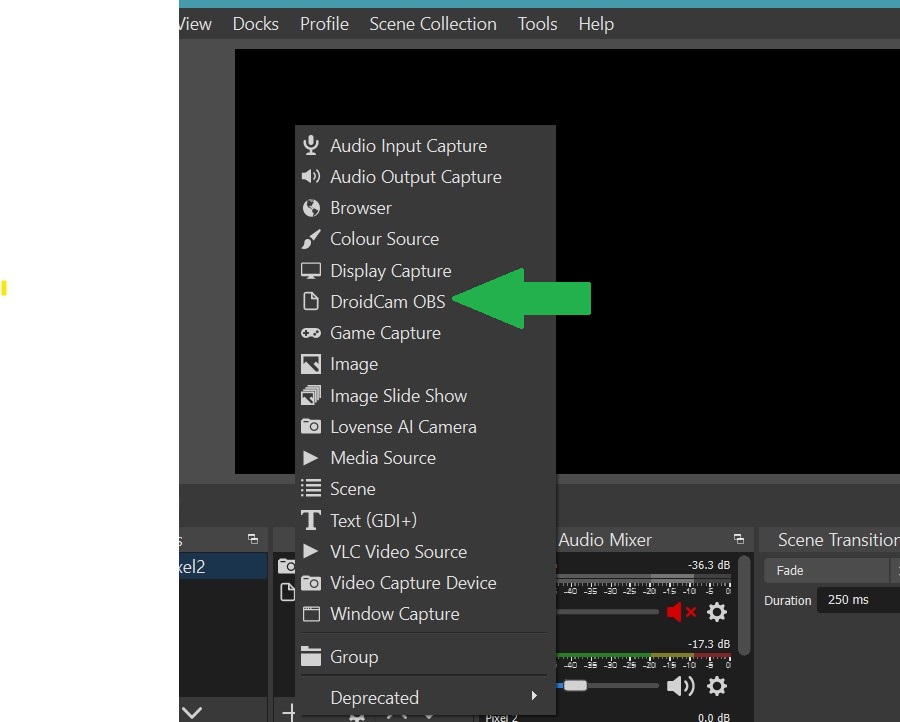
However I have an issue I have not been able to resolve. I use the cam on my mobile as a supplemetary camera for my feed. To do this I have an app on my mobile and a plug-in for OBS Studio on my laptop. My preferred app uses an OBS plugin rather than a separate app and it creates a new Source in OBS (please see the screenshot of how it appears in my standard OBS Studio installation). However I have not been able to figure out how to install the plugin on the StreamMaster's "internal" OBS. The installation process allows me to set the location of OBS but I cannot seem to get it to add the plugin to the StreamMaster version.
I have a workaround, but it would be great if there was a way to customize the version of OBS installed with StreamMaster by adding plug ins.
Thanks! I think this would be a useful update. In case it is helpful, the Android app I like is DroidCam OBS and is made by Dev47Apps (https://www.dev47apps.com/obs/). If there is any further information that would be useful, please do not hesitate to reach out. I would he happy to help. Cheers.